
How online learning looks in 2026
Online coding courses aren't a niche backup anymore. Most developers I know started with a browser and a compiler rather than a four-year degree. Companies still need more engineers than they can find, so learning to build software remains one of the fastest ways to change your career trajectory.
In 2026, we see a more mature landscape. The initial boom has settled, but growth continues, driven by the increasing accessibility of tools and the rise of AI-powered learning assistants. Platforms are adapting, offering more specialized learning paths and focusing on practical, job-ready skills. The question for learners isn’t if they should learn online, but where.
The emergence of AI tools is particularly interesting. These aren’t replacing instructors, but they are changing how people learn. Features like AI-powered code completion, automated feedback, and personalized learning recommendations are becoming commonplace. This means the gap between free and paid resources is starting to narrow, as even free platforms can leverage AI to enhance the learning experience.
Starting for free
For those starting their coding journey, free platforms offer an accessible entry point. Codecademy, for example, provides a robust free tier with interactive lessons covering languages like Python, JavaScript, HTML, CSS, and SQL (codecademy.com). You can build a surprisingly solid foundation without spending a dime. FreeCodeCamp (freecodecamp.org) takes a different approach, focusing on project-based learning and certifications in web and data science.
The strengths of these platforms are clear: they remove the financial barrier to entry and offer a broad range of introductory topics. They also foster a strong sense of community, with forums and discussion boards where learners can support each other. However, free resources often come with limitations. Personalized guidance is typically minimal, and the pace can be slower than a structured, paid program.
Another consideration is curriculum depth. While free platforms are great for initial exposure, they may not delve into advanced concepts or specialized areas. Khan Academy’s computer programming courses are also a valuable resource, particularly for those with a mathematical background. But, like Codecademy and FreeCodeCamp, the level of one-on-one support is limited. It's about self-direction and supplementing with external resources.
- Codecademy's free tier covers the basics of Python, JavaScript, and SQL through an in-browser editor.
- FreeCodeCamp: Web Development, Data Science, Responsive Web Design
- Khan Academy: Introductory programming concepts, JavaScript
When to actually pay for a course
Paid platforms represent a more significant financial commitment, but they often offer a more structured and intensive learning experience. Coding bootcamps, while often expensive, promise to rapidly equip students with job-ready skills. Subscription services like Udemy and Coursera provide access to a vast library of courses on virtually any programming topic.
The value proposition of paid platforms lies in their structured learning paths, mentorship opportunities, and career services. Many bootcamps and immersive programs include career coaching, resume workshops, and connections to potential employers. Project-based learning is also a key component, allowing learners to build a portfolio of work to showcase their skills.
Don't assume a high price tag equals a job. Some bootcamps are essentially expensive PDF collections with no real support. I'd suggest looking for programs that publish audited placement reports rather than just flashy marketing testimonials. If they won't show you where their last 50 graduates are working, walk away.
Udacity, for example, offers 'Nanodegrees' developed in partnership with industry leaders, focusing on in-demand skills. Coursera provides access to courses from top universities and institutions, often leading to certificates or even degrees. Udemy's strength is its breadth – you can find courses on almost any programming language or technology, often at very affordable prices.
Skill Paths: Focused Learning Journeys
Many platforms are now moving beyond traditional courses and offering 'skill paths' or 'career paths'. These are curated collections of courses and projects designed to prepare learners for specific roles, such as front-end developer, data scientist, or machine learning engineer. The idea is to provide a more efficient and focused learning experience.
Skill paths differ from traditional courses in their emphasis on practical application and career readiness. They often include real-world projects, portfolio building exercises, and guidance on job searching. The benefit is that you're not just learning concepts in isolation; you're applying them to solve real-world problems.
Whether these paths are worth the extra cost depends on your learning style and career goals. If you have a clear idea of the role you want to pursue, a skill path can be a highly effective way to acquire the necessary skills. However, if you're still exploring different options, a more flexible approach might be better. Some platforms offer skill paths as part of a subscription, while others charge a premium for access.
Free vs. Paid Online Programming Platforms: A Comparison for Career Advancement (2026)
| Dimension | Free Platforms (e.g., freeCodeCamp) | Paid Platforms (e.g., Codecademy, Coursera) | Skill Paths/Bootcamps |
|---|---|---|---|
| Time to Completion | Generally longer, self-paced | Potentially faster with structured learning | Fastest, intensive focus |
| Cost | Typically free or donation-supported | Subscription-based or per-course fees | Significant investment, often highest cost |
| Job Relevance | Good foundation, may require supplementing with projects | Often aligned with industry needs, some courses designed with employers | Strongest alignment, often includes career services |
| Depth of Coverage | Can be variable; core concepts often well-covered, advanced topics may be limited | Generally more comprehensive, wider range of topics available | Deepest dive, specialized skills development |
| Flexibility | Highest flexibility; learn at your own pace, on your own schedule | Moderate flexibility; structured courses with deadlines, but often self-paced options | Less flexible; cohort-based learning with fixed schedules |
| Community Support | Active forums and communities, but support quality can vary | Dedicated support teams, Q&A forums, and sometimes mentorship opportunities | Strongest community, direct access to instructors and peers |
| Project-Based Learning | Often project-focused, but scope may be limited | Increasingly incorporating projects, but varies by course | Extensive project portfolio building, often culminating in a capstone project |
Qualitative comparison based on the article research brief. Confirm current product details in the official docs before making implementation choices.
Community & Support: Beyond the Lessons
Learning to code can be challenging, and having a supportive community can make all the difference. The ability to ask questions, get help when stuck, and learn from others is invaluable. Different platforms offer varying levels of community support, from forums and discussion boards to Discord servers and Slack channels.
FreeCodeCamp is particularly well-known for its active and welcoming community. Learners often collaborate on projects, provide feedback to each other, and offer encouragement. Codecademy also has a thriving forum, but it can be less active than FreeCodeCamp’s. Paid platforms often offer dedicated support channels, but the quality can vary.
A strong community is especially important for beginners. It provides a safe space to ask 'dumb' questions, overcome challenges, and build confidence. Peer learning can also be incredibly effective, as explaining concepts to others reinforces your own understanding. When evaluating platforms, consider the size, activity level, and helpfulness of the community.
Tools & Technologies: What's Actually Taught?
It's not enough to simply say a platform teaches programming; you need to know what they teach. Python remains a popular choice for beginners due to its readability and versatility. JavaScript is essential for front-end web development, and increasingly for back-end development with Node.js. Java is still widely used in enterprise applications.
Most platforms cover these core languages, but the specifics vary. Codecademy emphasizes interactive learning, while FreeCodeCamp focuses on project-based learning. When it comes to frameworks, look for platforms that keep up with current industry trends. React, Angular, and Vue.js are all popular choices for building modern web applications.
It’s also important to consider emerging technologies. Platforms that offer courses on machine learning, artificial intelligence, and data science are preparing learners for the jobs of the future. Python is frequently used in these fields, along with libraries like TensorFlow and PyTorch. Don't assume that all platforms are created equal; carefully review the curriculum to ensure it aligns with your career goals.
Future-Proofing Your Skills: Beyond the Course
Completing a course or bootcamp is just the first step. The tech industry is constantly evolving, so continuous learning is essential. Building personal projects is a great way to apply your skills and demonstrate your abilities to potential employers. Contributing to open-source projects is another valuable way to gain experience and collaborate with other developers.
Networking with other developers is also crucial. Attend meetups, conferences, and online events to connect with people in the industry. Follow influential developers and thought leaders on social media. Stay up-to-date with new technologies by reading blogs, listening to podcasts, and exploring online resources.
The goal isn’t just to learn a specific language or framework; it’s to develop a mindset of continuous learning and adaptation. The ability to quickly learn new technologies and solve complex problems is what will set you apart in the long run. Resources like Stack Overflow, Reddit’s r/programming, and industry newsletters can help you stay informed and engaged.
Gear Up for Your Coding Journey: Essential Tools for Online Learners
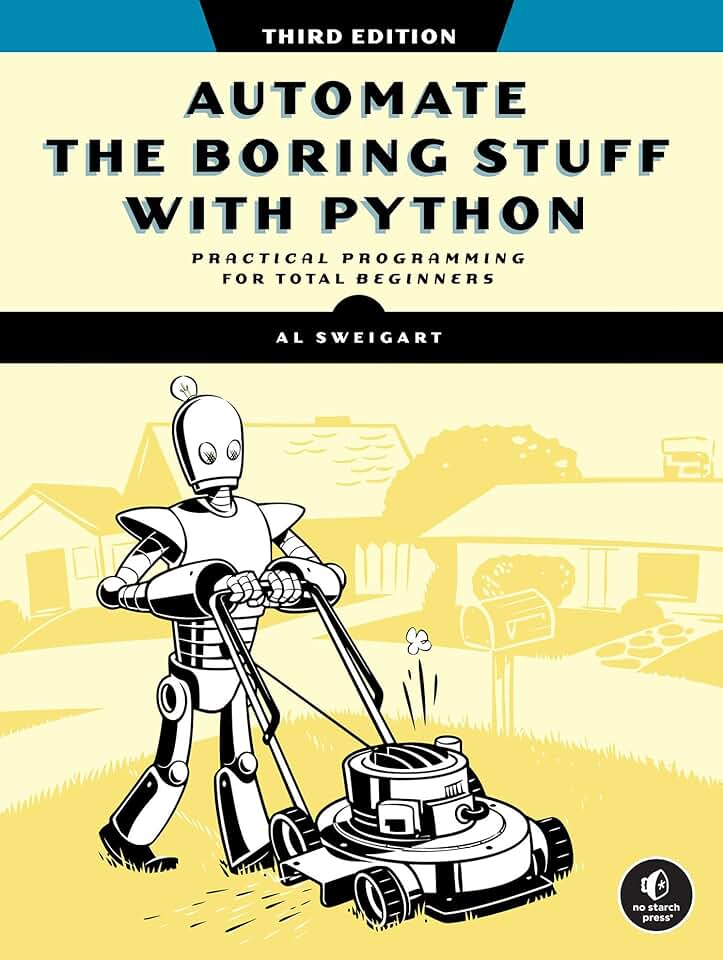
Teaches practical Python for everyday tasks · Covers web scraping, file management, and more · Updated for modern Python practices
Master the fundamentals of Python with this highly-rated book, perfect for automating repetitive tasks and building a strong programming foundation.
![Perixx PERIBOARD-535BR [Firmware Updated] Wired Ergonomic Mechanical Keyboard - Full-Size - Low-Profile Brown Tactile Switches - NKRO Anti-Ghosting - Compatible with Windows and macOS](https://m.media-amazon.com/images/I/71d5v14gj8L._AC_UY654_QL65_.jpg)
Ergonomic design for comfort during long coding sessions · Low-profile brown tactile switches for satisfying typing feedback · Full-size layout with NKRO anti-ghosting
Invest in your comfort and typing efficiency with this ergonomic mechanical keyboard, designed to reduce strain and enhance your coding speed.

Stunning 4K UHD resolution for sharp visuals · 27-inch IPS panel with HDR10 support · Borderless design and reader mode for eye comfort
Boost your productivity and coding clarity with this vibrant 4K monitor, offering ample screen real estate and excellent color accuracy for detailed work.

Industry-leading active noise cancellation for focused learning · Wireless Bluetooth connectivity with up to 24 hours of playtime · Comfortable over-ear design with deep bass
Create your ultimate focus zone with these noise-cancelling headphones, allowing you to dive deep into your studies without distractions.

Includes Raspberry Pi 4 with 4GB RAM · Comprehensive starter kit with essential accessories · Ideal for hands-on projects and learning hardware interaction
Get hands-on with programming and build your own projects with this all-in-one Raspberry Pi starter kit, perfect for exploring the practical side of coding.
As an Amazon Associate I earn from qualifying purchases. Prices may vary.

No comments yet. Be the first to share your thoughts!